FAQ
Where is Time Tracker's data stored on my machine?
Navigate to C:\Users\fill-in-your-user-name-here\AppData\Local\TimeTracker in File Explorer
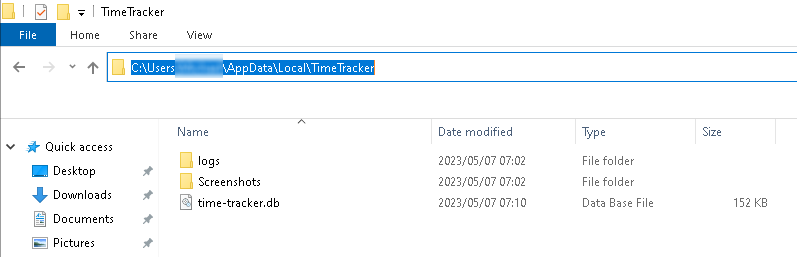
- logs - the application error logs used for diagnosing issues
- Screenshots - folder has the screenshots taken by the application divided by day.
- time-tracker.db - the SQLLite database storing all previously tracked time
Tip
Clean out old screenshots from time to time as this folder can grow quite large
How to I backup Time Tracker's data as I'm changing to a new PC
See the section where Time Tracker is storing its data. Copy or zip the contents of the folder to your backup medium.
Then simply create the TimeTracker folder in the **\AppData\Local** folder on your new computer and start Time Tracker
I would like to Sync my Time Tracker data between multiple machines. How would I go about that?
Unfortunately Time Tracker does not have any networking capabilities at present. If this is a very common requirement then I will consider building in this functionality in future
How to remove Time Tracker from my computer?
Find the Time Tracker tray icon
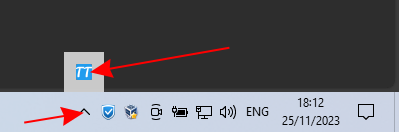
Right-click on the tray icon and select the Exit menu option
Next, we will remove the screenshots and database for the tool. In File Explorer, navigate to C: \Users\fill-in-your-user-name-here\AppData\Local\TimeTracker now delete the contents of this folder
Finally, remove the zip file and the files you have extracted.
Time Tracker will now be completely uninstalled from your computer.